 Aurora
A LITTLE GUIDANCE. A LOT TO CREATE.
Find your next step.
From your first upload to your next mint.
Practical guides to help you get things done in Aurora.
Create my first collection
Artwork, contract, first mint. Follow the steps.
COLLECTOR GUIDEMint from a creator
Check the phase, connect and review your mint.
PREMIUM GUIDESet up my workspace
Link your wallets and put Premium to work.
Contract function reference
Every readable and writable collection function, with arguments, permissions and one-way actions explained. Choose your collection type.
YOUR FIRST COLLECTION
One step at a time.
Uploading artwork, deploying a contract and opening a mint are different actions. Here’s how they fit together.
Follow the collection guide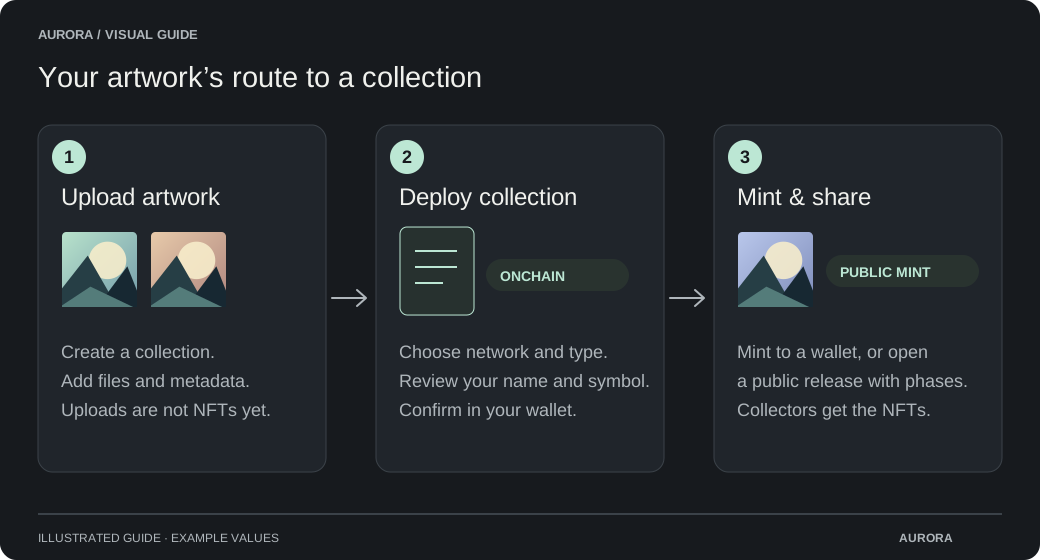
THE HELP LIBRARY
Browse by what you want to do.
42 guides. No wallet connection needed.
Start here
Find your way around Aurora and choose your access.
Create a collection
Bring your artwork from upload to its first mint.
- Upload artwork & add metadata
- Understand OpenRarity & AuroraRarity
- Hand over a collection
- Collectibles Studio
- Deploy your first collection
- Design your page & share a preview
- Launch a public mint
- Build a whitelist & import holders
- Use placeholders & reveal artwork
- Choose when trading starts
- Enable CAPTCHA on a mint
- Mint your artwork to a wallet
ArtLab
Create artwork from layers, shape trait rarity and render your collection with Premium.
Smart contracts & functions
Ownership, mint payments and every readable and writable contract function.
- Understand your collection contract
- ERC-721-C collection function reference
- ERC-1155-C collection function reference
- Legacy Collectibles V1 (ERC-1155-C) collection function reference
- Collectibles V2 pack engine function reference
- Collectibles V2 collection function reference
- Collectibles V3 pack engine function reference
- Collectibles V3 collection function reference
- Withdraw mint funds
Collect NFTs
Explore releases, understand phases and mint with confidence.
Your workspace
Organize wallets, share artwork and use your Premium tools.
Safety & troubleshooting
Review permissions and get help when an action gets stuck.
Partner integrations
Connect your service to Aurora’s published mint feed.