 Aurora
Your profile, wallets & NFTs
Personalize your profile with a nickname and picture, and link verified wallets with Premium.
On this page
Add your nickname and profile picture
Open Profile and sign in with your wallet. Nickname & picture is available without Premium. Choose a unique @nickname using 3–30 letters, numbers or underscores, then save it. Nicknames are stored in lowercase. Leave the field empty and save to remove your nickname.
Choose Add picture or Change picture to upload a JPG, PNG, WebP, GIF or AVIF up to 5 MB and 25 megapixels. Pictures save immediately and are cropped to a square. Animated images use their first frame. Remove picture restores the default avatar.
Linked wallets share the primary wallet’s nickname and picture. Only the primary wallet can change them. Your nickname and picture personalize your profile settings; they do not change your wallet address, collection artwork or contract ownership.
Link a wallet you own
Open your Profile
Start from the Premium profile you want to use. Your primary wallet identifies that profile.
Use the linked-wallet controls
Follow the flow to connect and verify another wallet you control. A typed address alone does not prove ownership.
Confirm the linked wallet appears
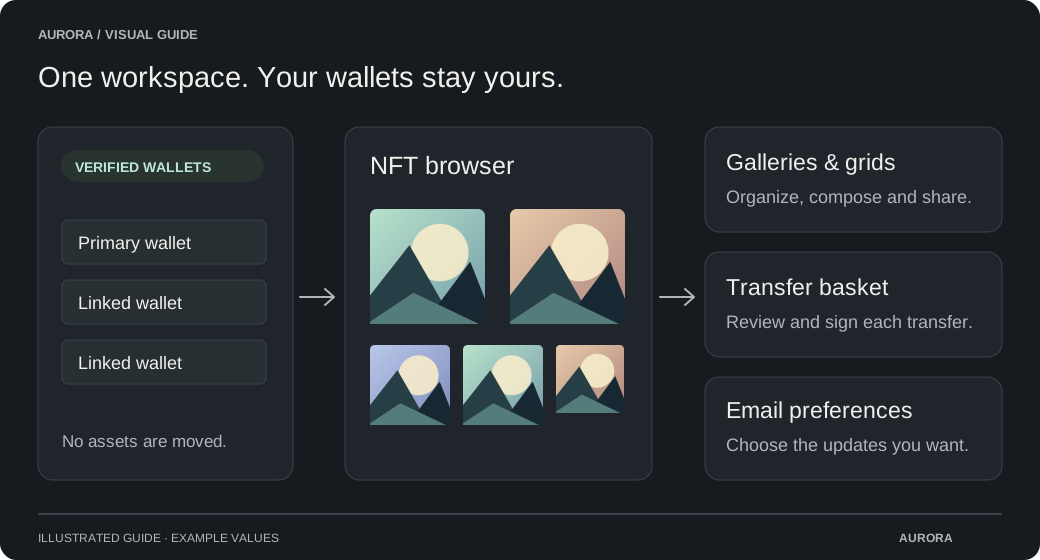
You can bring up to 15 verified wallets into one Premium profile. Linking shares profile access; it does not move assets or merge wallets.
Browse NFTs across your wallets
Open the NFT browser and select the wallet and supported network you want to view. Use search and the available display controls to find an item. Artwork and metadata can take time to load because provider coverage varies.
Use hidden-item controls to organize your own view. Where available, OpenSea warnings provide additional information about an item. A missing warning is not proof that an NFT is safe.
If an NFT is missing
- Check the selected wallet and network.
- Confirm the mint or transfer succeeded in the network explorer.
- Allow time for indexing and refresh the view.
- For unrevealed NFTs, check whether the creator still needs to reveal the artwork.