 Aurora
Understand your collection contract
How Aurora’s ERC-721-C and ERC-1155-C collections handle ownership, payments, artwork, trading and royalties.
On this page
Contract function reference
Every readable and writable collection function, with arguments, permissions and one-way actions explained. Choose your collection type.
Two collection types, the same creator controls
The C standards add transfer validation for supported marketplace creator-fee policies. Both collection types have owner controls for minting, metadata, royalties and trading. Network gas, artwork prices and platform fees are separate costs.
| Collection type | How tokens work |
|---|---|
| ERC-721-C · Unique NFTs | Each minted artwork has its own token ID and one owner. |
| ERC-1155-C · Editions | An artwork has one token ID with multiple copies. Collectors can hold more than one copy of that edition. |
Your wallet owns the collection
For new native-mint collections, the wallet that deploys the collection becomes its owner. Aurora’s factory deploys the contract; it does not become the collection administrator. Choosing an artist’s payment wallet does not give that wallet owner permissions.
The owner can configure releases and royalties, pause or permanently close minting, publish metadata revisions, enable trading and withdraw retained mint proceeds. Ownership transfer uses two steps: the existing owner nominates a new wallet and that wallet accepts. A pending scheduled reveal must be completed or cancelled before ownership changes.
Some older collections use a separate mint controller. In that setup the controller owns the collection and its owner wallet administers the mint. Check the contract addresses and owner for your particular deployment.
Choose when your artist receives mint payments
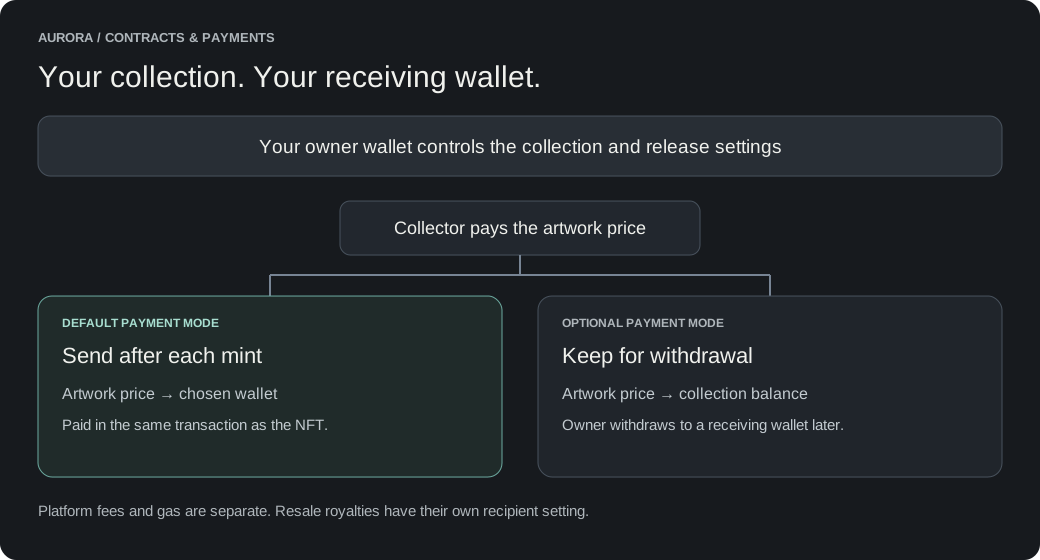
Only the artwork price goes to the mint proceeds wallet. Aurora’s platform fee is processed separately. Free artwork has no creator payout, although platform fees and gas may still apply. Resale royalties are configured separately.
The owner can change the mode or receiving wallet for future mints of an open release. Aurora pauses the release while applying the change, then restores its previous pause state. Previously retained proceeds remain available for withdrawal; switching to direct payment does not automatically send that old balance.
Direct payment requires a wallet or contract that accepts the network’s native currency. If it rejects payment, the entire mint reverts, including the NFT and platform-fee transfer. A mined failed transaction can still cost gas. The owner can correct the receiving wallet or switch to withdrawal mode before retrying.
Set the Mint proceeds wallet
Enter the wallet that should receive the artwork price. This can be the artist’s wallet and does not need to be your deployment wallet.
Choose Mint proceeds payment
Send to wallet after each mint is the default for new releases on supported collections. The contract forwards the artwork price in the same transaction as the mint. Choose Keep in contract for withdrawal to accumulate proceeds instead.
Publish and approve the settings
Review the receiving address and sign the required wallet transactions. Aurora shows the approval steps. Payment settings are recorded onchain before the release opens.
Who can withdraw retained proceeds?
Only the mint contract’s owner can authorize a withdrawal. Aurora fills the saved Mint proceeds wallet as the recipient. The owner can also call withdraw manually with a chosen recipient and amount. The saved wallet is not an irreversible restriction on the owner’s withdrawal authority.
Retained proceeds are held onchain in the collection or legacy controller. Aurora does not hold them in an offchain account. The proceeds balance can include multiple releases. You can withdraw while minting is active, paused or finished.
Artwork, metadata and reveal
The owner controls metadata updates after mint. There is no separate metadata-only freeze switch. An immutable file reference identifies a fixed version, but the owner can publish a new reference. Renouncing ownership permanently removes this ability along with every other owner control.
This flexibility supports long-term maintenance: creators can correct metadata or move to another compatible storage provider if a provider becomes unavailable. The new ERC-721-C 0.6 and ERC-1155-C 0.3 builds accept URI schemes without a protocol allowlist, including IPFS, HTTPS and future storage schemes. Older deployed contracts keep their original restrictions. Aurora uploads still use IPFS; changing to another provider currently requires an owner transaction through a contract interface.
A reference is not a hosting guarantee. HTTPS content can change at the same address, and future storage schemes need support from wallets and marketplaces to display them. Metadata directories must end with a slash and provide decimal token-ID JSON files; the contract does not check that a provider is online.
Delayed reveal initially shows placeholder artwork. In Aurora, scheduled Reveal and Force reveal both end the current release and publish its committed artwork through owner-wallet approvals; the countdown does not send a transaction by itself. Force reveal can be used before the planned time, including after minting has stopped or finished. After confirmation the countdown disappears. To mint more later, choose Add another release and set new phases, dates and prices in the same collection; the collection itself is not permanently closed.
Trading and creator fees
Before the first mint, choose whether trading starts with that mint or is enabled manually later. Enabling trading is one way: transfers cannot be locked again with the trading switch. Pausing minting does not pause already-enabled trading.
The royalty recipient and percentage describe secondary-sale royalties, not primary mint payments. Royalties are capped at 10%. Enforcement depends on the selected validator policy and the marketplace’s supported trading route; ERC-721-C or ERC-1155-C alone is not a promise that every resale pays royalties.
From ERC-721-C 0.6.0-beta.2 and ERC-1155-C 0.3.0-erc1155-beta.2 onward, the collection owner can replace the active transfer validator with updateTransferValidator, for example when migrating to a reviewed security update. This changes transfer validation, not the collection implementation. Older deployed collections retain their original restrictions.
Setting the validator to 0x0000000000000000000000000000000000000000 disables validator checks. The owner can restore the previous validator or choose a replacement later. While disabled, validator-based royalty enforcement and other validator restrictions stop. The royalty recipient and percentage remain recorded; marketplaces may still honor them voluntarily. Holder approvals, network gas, mint platform fees and the collection trading lock still apply.
Replace, disable or restore a transfer validator
This is currently an owner transaction through the collection’s block explorer, such as Basescan. Use the collection address and its verified contract interface, including Read as Proxy or Write as Proxy if shown. The inherited setTransferValidator remains blocked for direct calls: use updateTransferValidator.
Before replacing it, verify that the new validator is trustworthy, supports your token standard and works with your intended marketplace routes on this chain. Having contract code alone does not establish compatibility. Token-type registration is attempted automatically, but security policies and operator lists do not automatically migrate; configure and verify them with the new validator’s supported tools.
Record the current validator
Read owner and getTransferValidator on your collection. Save the current validator address so you can restore it if needed. The separate validator getter records the initial deployment binding and does not track later changes.
Choose the new setting
Connect the collection owner wallet. Open updateTransferValidator and enter the compatible replacement address. To disable validation, enter the full zero address: 0x0000000000000000000000000000000000000000. Do not leave the field blank or type the word null.
Confirm and verify
Review and confirm the wallet transaction. After confirmation, read getTransferValidator again and check that it matches your intended setting. Zero means disabled.
Restore after a temporary disablement
Call updateTransferValidator again with the saved or replacement address, verify its policy and test the intended transfer route. Replacing a validator does not automatically approve it to move holders’ NFTs.
Permanently give up owner controls
The new builds provide renounceOwnership as a final, irreversible action. It sets the owner to the zero address and clears any pending ownership transfer. Neither Aurora nor the previous owner can restore control afterward.
Before renouncing, finish your metadata and royalty settings, permanently close minting, enable trading, withdraw all retained proceeds and complete or cancel the pending reveal. The contract rejects renunciation until those conditions are met. Cancelling a reveal does not publish final artwork: do not renounce while tokens still need a metadata update.
Renunciation is currently a manual owner transaction through the collection’s explorer interface. It prevents future owner changes to metadata, royalties, payout settings and mint controls. It does not make a web server’s content immutable or freeze external validator policies, and it removes your ability to perform validator administration that requires collection ownership.
What happens if Aurora is unavailable?
Minted NFTs and their ownership records remain on the blockchain. The deployed contract exists independently of Aurora’s website. Owners can use supported contract functions through an explorer or another interface. Artwork availability and marketplace display also depend on storage and marketplace services.
Public minting in these builds requires a signed Aurora fee authorization, including when the platform fee is waived. An unavailable signing service can therefore stop new public mints. That signing authority cannot use owner-only functions, take collection ownership or withdraw creator proceeds.
The collection uses a fixed implementation and is not upgradeable. New features and code fixes require new deployments; existing tokens are not automatically moved or upgraded. Local security tests and code review are not an independent security audit or a guarantee of safety.