 Aurora
User Q&A
Answers about signing in, wallets, minting, fees and staying safe as an Aurora user.
On this page
Can I use Aurora without an existing crypto wallet?
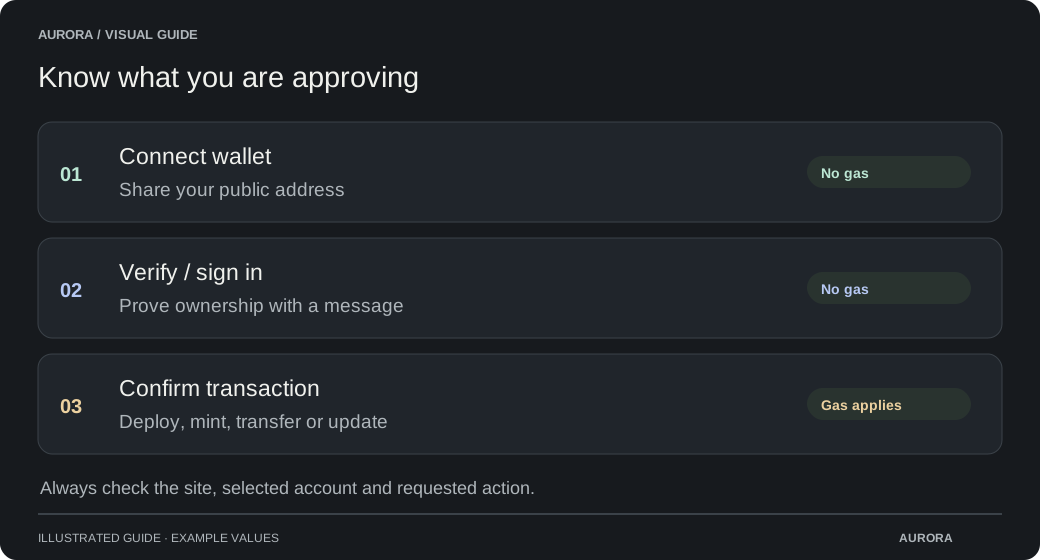
Choose Sign in to see the available wallet, Google and passkey options. Account sign-in can create an Aurora Wallet. Available methods depend on platform settings; check the wallet and network offered by each action before continuing.
Can I register with email instead of a password?
When email registration is enabled, verify your email and create a passkey to finish. Aurora does not use username-and-password login. Email codes alone cannot sign you in or replace an existing passkey.
What if I lose access to my passkey?
Try your passkey provider on another device or another sign-in method already linked to your account. While you still have access, review Account & security and add a backup method. Email verification alone cannot restore access.
Are my Aurora Wallet and MetaMask the same wallet?
They can have different addresses and balances. Check the receiving address and selected wallet before minting, sending or funding. Linking an external wallet does not move its funds into your Aurora Wallet.
What does minting an NFT mean?
Minting creates an NFT or edition copies on a blockchain and records the receiving wallet as the owner. It does not automatically grant copyright to the artwork. Read the creator’s terms and collection details before minting.
Why does a free mint still ask for payment?
Review mint checks your chosen quantity, current allowance, personal price and available supply before opening the confirmation. Check the mint price, platform fee, quantity, network and receiving wallet. The wallet also shows network gas. A zero artwork price can still have a platform fee and gas.
Why do I need funds on a particular network?
A collection belongs to the network chosen at deployment. Approve a network switch only after checking it matches the collection. You need that network’s native token for gas; a balance on another chain does not cover it.
Why can’t I mint even though the page is open?
Check the active phase, its start time, remaining supply and your wallet allowance. Whitelist and holder phases may require a specific wallet or qualifying NFTs. Being on a list does not reserve supply unless the collection explicitly provides that.
My mint is pending. Should I try again?
If a transaction is pending, check Transaction details and your wallet activity. Do not send another mint just because the page is still confirming.
What happens if my mint transaction fails?
If a transaction was sent, check its receipt before retrying. A confirmed revert creates no NFTs and reverses the mint payment, but can still cost network gas. If it is pending or the result is unknown, keep checking that transaction instead of submitting another.
Why is my NFT missing or showing a placeholder?
Check the receiving wallet, network and transaction receipt first. Wallets and marketplaces may take time to display new NFTs or refreshed artwork. A placeholder can remain until the creator completes the reveal; refreshing cannot reveal it early.
Why can’t I transfer or sell my NFT?
A collection may keep trading locked until its creator enables transfers. Marketplace or contract rules can also restrict transfers. Check the message and the collection’s rules; changing a gallery setting cannot unlock the contract.
What should I check before sending an NFT?
Check the network, collection, token ID, destination and any quantity shown. Remove anything you did not intend to send.
A successful blockchain transfer cannot be undone by changing a recipient label or removing an item from the basket.
Is Aurora Simulation real money?
No. SIM and simulation NFTs are for testing and have no cash value. A successful simulation does not mint an NFT on a live network. Check the network label before approving a real transaction.
How do I avoid wallet and mint scams?
Check the site address, collection contract and network. Never share your recovery phrase, private key or verification code with anyone claiming to be support. Reject unexpected signatures and transactions, and avoid claim links inside unsolicited NFTs.
Does signing out remove wallet permissions?
No. Signing out or disconnecting a website does not revoke blockchain approvals. Review unwanted token and NFT permissions in Security & safety. Revoking requires a confirmed transaction and may cost gas; it does not recover assets already transferred.
Can Aurora undo a completed mint or transfer?
Aurora cannot reverse a confirmed blockchain transaction. Contact the creator about any refund terms; do not assume a refund is available. Never send more funds to someone promising to recover a payment.
Does a verification badge guarantee a safe mint?
Aurora verification is separate from OpenSea verification and from source-code verification on a blockchain explorer. Creators cannot add it through collection names or artwork. Always check the collection address and network before minting. The badge is not a guarantee of future project performance.
Can I choose the artwork number I receive?
Follow the release’s stated mint rules. Random order does not guarantee a particular artwork; sequential order is shared across the release’s phases. A whitelist place alone does not reserve a particular artwork number.
What information should I include when asking for help?
Share the page link, network, public wallet address, transaction hash and exact error message. Never share recovery phrases, private keys, sign-in codes or private account links. For suspicious collections, use the collection’s report option.